
What a Production Agent Actually Runs On
A demo agent needs a model, a prompt and some tools. A production one needs runs it can cancel, state it did not write, knowledge that stays current, four channels, and a record of every decision. A tour of the layer underneath.


Key takeaways
- A demo agent needs a model, a prompt, tools and knowledge. A production one needs about eleven more things.
- A request is something you wait for. A run is something that exists, can be cancelled, and leaves a record.
- Three of the eleven are observability, because most production failures are unexplained behaviour rather than crashes.
- The list is short and well known. What makes it expensive is meeting each item as an incident instead of a decision.
There is a particular kind of surprise that comes a few weeks after an agent goes live. The agent itself is fine. It answers well, it calls the right tools, the demo that won the project still works exactly as it did.
What is not fine is everything around it. A request that cannot be stopped. A conversation that starts from nothing every time. A customer asking why the system told them something, and no way to find out.
None of that is agent design. It is the runtime: the layer an agent stands on once real people are using it. This is a tour of that layer, what each piece is for, and why each one tends to be discovered rather than planned.
The agent, and everything underneath it
An agent you can demo is a short list of things. A model. A prompt that tells it what it is for. A few tools it is allowed to call. Some knowledge to ground it. Assemble those four and you have something that answers questions convincingly in a meeting.
None of that is what breaks when you put it in front of customers.
What breaks is the part nobody designed. The request that hangs for ninety seconds with no way to stop it. The second conversation that has forgotten the first. The reply that streams to one channel and not another. The answer nobody can explain three weeks later because the run was never recorded.
This is a tour of that second part: the layer an agent needs underneath it before it can take a real customer, what each piece is actually for, and what it looks like when it is already there.
What production asks for, and where it lives
Every item below arrives the same way: not as a requirement in a spec, but as something that goes wrong once there are real users. The useful exercise is to name them in advance and decide, for each one, which layer answers it.
| What goes wrong | What it needs | Where it lives |
|---|---|---|
| A run hangs, and the user waits | Cancellation | Run lifecycle |
| The agent forgets the last message | Durable conversation state | Threads |
| Replies arrive as one slow block | Token streaming | Transport |
| One user sees another user’s history | Per-user scoping | Identity |
| Answers go stale as the business changes | Retrievable knowledge | Knowledge base |
| It works on web but not WhatsApp | Channel fan-out | Channels |
| Nothing happens unless a human asks | Triggers and schedules | Workflow |
| A refund goes out unreviewed | Human approval | Control |
| Nobody can explain a wrong answer | Recorded runs | Observability |
| Costs drift with no visible cause | Per-run token accounting | Observability |
| A tool changes shape and breaks quietly | Step-level inputs and outputs | Observability |
Three of those eleven are observability, which is not a coincidence. Most of what goes wrong in production is not a crash. It is behaviour you cannot account for, and the only defence is a record.
A run is an object, not a request
The first thing that changes when an agent goes to production is that a request stops being a good unit of work.
A request is something you send and wait for. A run is something that exists: it has an identity, a state, a start and an end, and it keeps existing whether or not the caller is still listening. The distinction sounds academic until the first time a user closes the tab halfway through a two-minute job.
Conversational
Execution
Starting a workflow run takes the inputs it needs and nothing else:
{
  "variables": { "topic": "quarterly report" },
  "user": "user-123"
}
The conversational surface is deliberately OpenAI-compatible, which is less a feature than an admission: there is no value in inventing a new chat protocol, and an SDK your team already has is worth more than a better-designed one they do not.
{
  "messages": [{ "role": "user", "content": "Hello!" }],
  "stream": true,
  "user": "user-123"
}
Two fields in there do more work than they look like they do. stream decides whether the user watches the answer arrive or stares at a spinner. user decides whose conversation this belongs to. Both are covered below.
Cancellation, and the tokens you are still paying for
Cancellation is the least glamorous thing in this article and the one most likely to be missing. It also contains a trap that is worth stating plainly, because almost everyone gets it wrong the first time.
When a user navigates away, your client aborts the HTTP request and the UI moves on. It feels finished. On the server the model carries on generating, calling tools, and consuming tokens for an answer that nobody will ever read. You are billed for all of it.
Abort the connection
Cancel the run
Doing it properly means doing both: stop the UI immediately so the user gets their click back, then tell the server to stand down.
controller?.abort();                 // the UI stops now
if (runId) await chat.cancel(runId); // the server stops too
The identifier you need is handed to you continuously rather than only at the end. run_id comes back on every response and every streamed chunk from the chat surface, and as id from a workflow run, so a reply that is still streaming can be cancelled at any point during it.
One endpoint covers both surfaces. Cancelling a chat generation and cancelling a workflow run are the same call, which is the sort of detail that sounds like tidiness and turns out to be one less branch in your error handling.
Threads: the state you did not have to write
The gap between a demo and a product is often exactly one message. The demo asks a question and gets an answer. The product asks a follow-up, and the agent has no idea what “it” refers to.
Conversation state looks trivial until you build it. Then it is a store, a schema, an eviction policy, a per-user index, a transcript endpoint, and a decision about how much history to replay into each call without blowing the context window.
- History loaded
- Reply generated
- Both appended
The transcript being readable over HTTP is the part worth noticing. It means your own product can show a user their history without keeping a second copy of it, and it means support can open the same conversation the customer is describing rather than asking them to paste it.
Streaming, and why latency is partly a perception problem
An agent that calls two tools before answering is going to take several seconds. There is no prompt clever enough to avoid that, because most of the time is spent waiting on somebody else’s API.
What you can change is whether the user experiences it as several seconds of nothing, or several seconds of something happening. A streamed reply starts appearing in a few hundred milliseconds. The total is identical. The experience is not.
{ "stream": true }Streaming is one line in the request and a meaningful amount of infrastructure behind it: an event protocol, connection handling, partial-token buffering, and a story for what happens when the connection drops mid-answer. It is the clearest example in this article of a feature that is trivial to ask for and tedious to own.
One agent, many end users
Here is a distinction that causes real damage when it is missed. The person who built the agent is not the person talking to it.
You have an account. Your client has an account. But your client’s customers are a third category, and there can be a hundred thousand of them. They do not log in to the platform. They are identified by whatever your application already calls them.
{
  "messages": [ ... ],
  "user": "user-123"
}That third layer is what GET /threads is scoped by. Get it wrong and one customer sees another’s history, which is the kind of bug that ends a contract rather than filing a ticket.
Knowledge, and the half-life of a correct answer
Every grounded agent faces the same slow failure. It was accurate at launch, and the business kept moving. The refund window changed. A product was discontinued. The answer is still fluent, still confident, and now wrong.
Retrieval is the standard fix, and the standard fix has a standard cost: a chunker, an embedding model, a vector store, a retrieval step, and a reindexing job nobody owns. The part that is genuinely yours in all of that is the source documents.
// Search a knowledge base directly, outside any agent.
// Useful for a site search box, or for checking what
// the agent would have retrieved before blaming the prompt.
That endpoint being callable on its own is worth more than it first appears. When an agent gives a bad answer, the first question is whether the retrieval was wrong or the reasoning was. Being able to run the search by itself answers that in one request instead of a debugging session.
One agent, four channels
Most agents start on a website widget and stay there, not because that is where the customers are but because that is the only surface that was built.
The work of adding a channel is rarely the agent. It is the adapter: a messaging provider’s webhook format, delivery receipts, session mapping, media handling, and for voice an entire real-time audio path with its own latency budget.
- REST API
- Web chat
- Voice
Voice deserves a note, because it is the channel that most changes the engineering. Text tolerates a two-second pause. A phone call does not, and the budget has to cover speech recognition, the model, tool calls and speech synthesis inside the window where a human would have started talking again. It is billed separately for that reason, at a per-minute platform fee on top of the usual execution cost.
Work that starts without a person
An agent that only acts when someone types is half a product. A great deal of valuable automation is work nobody wants to remember to start: the nightly reconciliation, the inbound email that needs routing, the form that should create a record.
A person acts
A system acts
A tool acts
The clock acts
A scheduled trigger is the cheapest of these to underrate. It is also the one that turns an assistant into a process, because it removes the requirement that somebody remembers.
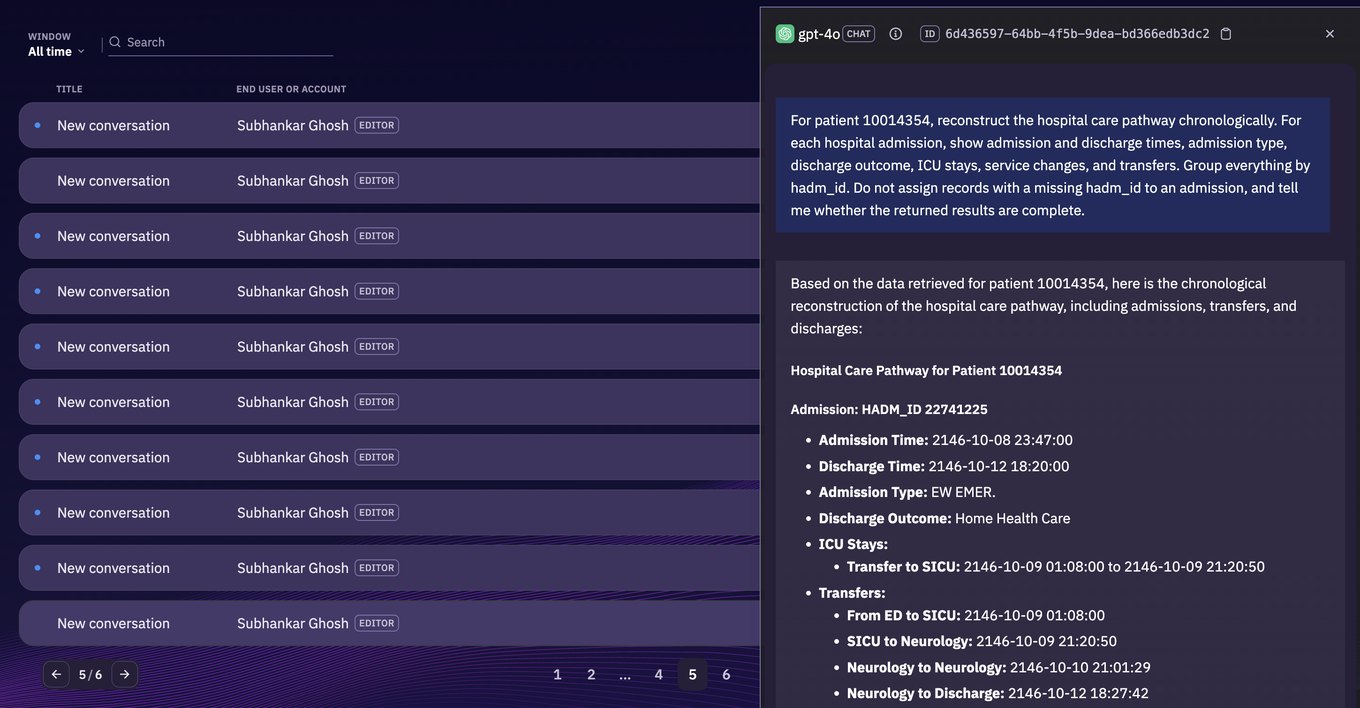
The record you did not have to instrument
Everything above is the machinery that makes an agent work. This is the machinery that makes it accountable, and it is the part teams most often postpone until the first serious dispute.
The difficulty is specific to agents. With ordinary software you can read the code and know what it will do. An agent’s path depends on choices the model makes at runtime, which means the only reliable account of what happened is a recording of what happened.
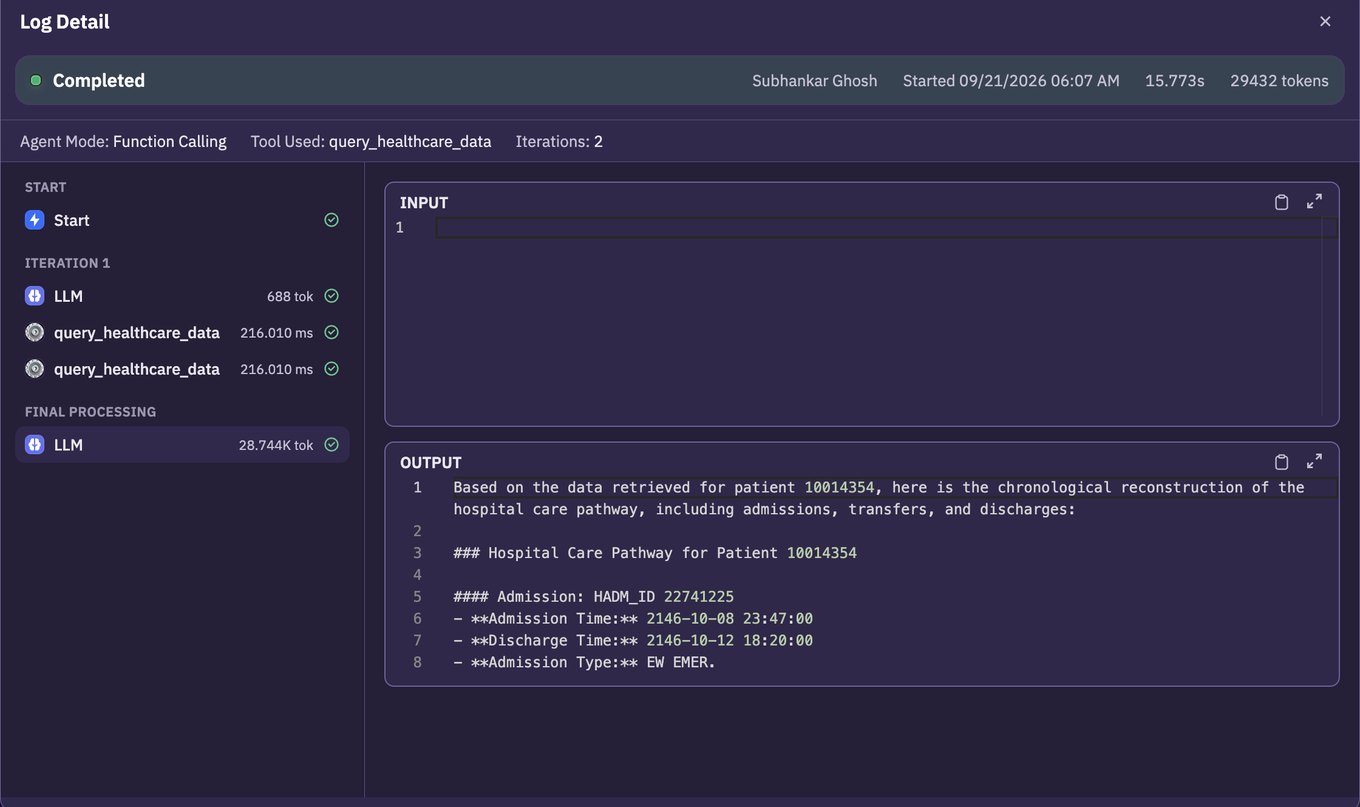
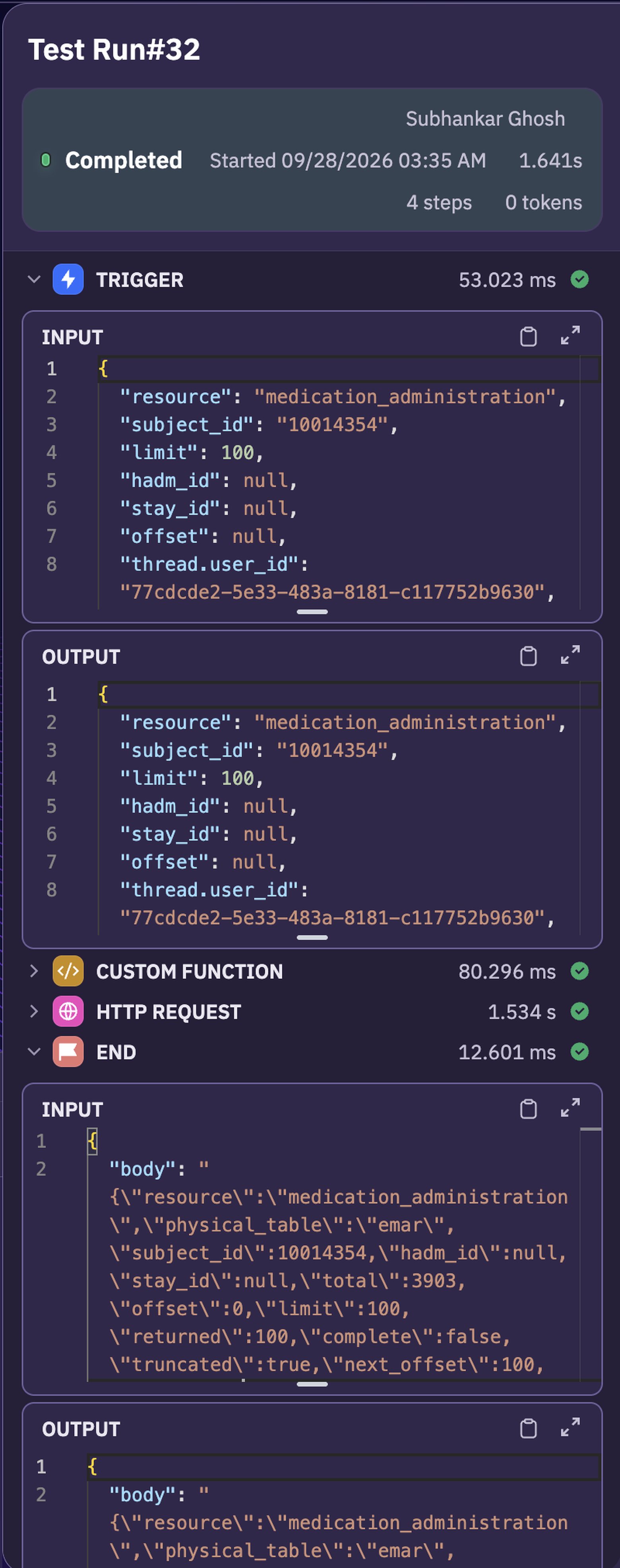
A useful record answers four questions without you having added a single line of logging:
- What did it decide? How many iterations, which mode, where the loop ended.
- What did it call? Each tool, its arguments, and what came back.
- What did it cost? Tokens per step, which is where cost drift becomes visible rather than mysterious.
- How long did each part take? Per-step timings, which is usually how you discover the slow thing is not the model.
The second of those is the one that earns its keep. Most surprising answers come from what a tool returned, not from the model’s reasoning about it, and the tool boundary is invisible from the reply.
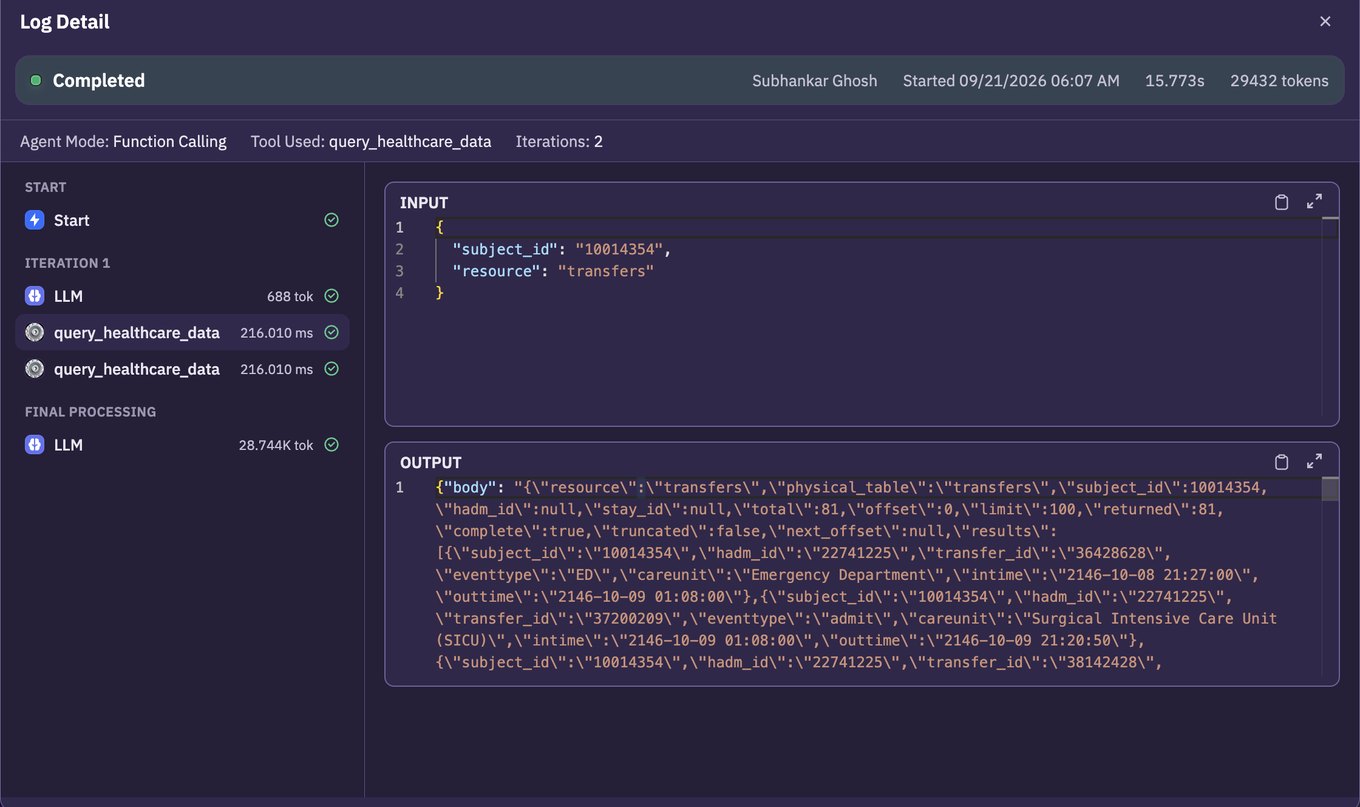
We wrote up one worked example of exactly this in reading the run instead of the reply, where a confident, well-structured answer turned out to be built on a hundred records out of three thousand nine hundred.
What this layer does not do for you
A tour like this is only useful if it is honest about its edges, so here are the things the runtime does not solve.
- It will not make a vague agent precise. Instructions, tool design and knowledge quality are still the work, and no amount of infrastructure underneath compensates for an agent that was never clearly specified.
- It does not own your correctness. If a tool returns partial data, the platform will faithfully record an agent confidently summarising partial data. Paging, validation and the shape of what a tool returns remain yours.
- It is not a general application platform. This is a runtime for agents and workflows. The product around them, the billing, the onboarding, the customer UI, is still something you build.
- Connector coverage has limits. If a client’s stack includes something unusual, check it is supported before you promise it rather than after.
The part you discover, discovered in advance
If there is one thing worth taking from this, it is that the list at the top of this article is not long. Eleven items. None of them exotic, none of them research problems, all of them known in advance by anyone who has shipped an agent before.
What makes them expensive is that they are usually met one at a time, in production, each one arriving as an incident rather than a design decision. The first hung request becomes cancellation. The first angry customer becomes run history. The first contract that mentions WhatsApp becomes a channel adapter.
Knowing the list in advance is most of the value. Whether you build that layer, buy it, or assemble it from pieces is a reasonable thing to disagree about, and it depends on how much of your time is worth spending on infrastructure that has been built many times before.
If you want to see what it looks like already assembled, start free with $10 in credit, or read the API reference to see the surface described above in full.