
The Same Support Agent, Built Four Ways
One task, implemented in the OpenAI Agents SDK, CrewAI, LangGraph and the Claude Agent SDK, then configured in Xpectrum. What each abstraction asks you to write, and when a framework beats a platform.


Key takeaways
- Each framework hands you a different vocabulary: agent and runner, role and task, nodes and edges, prompt and permissions. The vocabulary is the real difference, not the feature list.
- None of the four short examples contains knowledge, approvals, channels or a record of what happened. That work is outside their scope and it is where most of the time goes.
- Frameworks are the right answer when the agent loop is your product, the control flow is unusual, or it must live inside an existing service.
- The useful question is what fraction of your estimate is the agent, and what fraction is everything around it.
“Why would a developer not just use LangGraph?” is a fair question, and it deserves a better answer than a feature table.
They absolutely could. All four of the frameworks below are good, actively developed, and used in production by serious teams. Pretending otherwise would be both wrong and easy to disprove.
What is worth understanding is that they are solving a different problem from the one a platform solves, and the clearest way to see it is to build the same small thing in each.
One task, five times
Comparisons of agent frameworks usually end up comparing feature tables, which tells you very little about what it is like to build with any of them. So here is a single task, small enough to hold in your head:
What follows is that task in the OpenAI Agents SDK, CrewAI, LangGraph and the Claude Agent SDK, then the same thing configured in Xpectrum. The snippets are deliberately minimal. None of them is a production application, and each framework has a great deal more in it than one example shows.
The interesting part is not which is shortest. It is what each one asks you to think in.
OpenAI Agents SDK: an agent and a runner
You write the tool as a Python function, declare the agent, attach the tool, and hand it to a runner.
from agents import Agent, Runner, function_tool

@function_tool
def get_order(order_id: str) -> dict:
    # Shopify, your database, an internal API
    return {"status": "Shipped", "delivery": "Tuesday"}

support_agent = Agent(
    name="Customer Support",
    instructions="Help customers. For order questions, use get_order.",
    tools=[get_order],
)

result = Runner.run_sync(support_agent, "Where is order #12345?")
print(result.final_output)
The SDK infers the tool schema from your type hints and docstring, so @function_tool is most of the integration work. Runner owns the loop: call the model, handle any tool calls, append the results, go again until there is a final answer.
The mental model is a single capable agent you hand tools to. Handoffs, sessions, guardrails and tracing all hang off that same object.
CrewAI: roles and the jobs you give them
CrewAI frames the same work as staffing. You describe who the agent is, what it is for, then the task it has been handed.
from crewai import Agent, Task, Crew

support_agent = Agent(
    role="Customer Support Agent",
    goal="Resolve customer questions",
    backstory="You are an expert support representative.",
)

support_task = Task(
    description="Answer the question. Look up order information when needed.",
    expected_output="A helpful answer for the customer",
    agent=support_agent,
)

crew = Crew(agents=[support_agent], tasks=[support_task])
result = crew.kickoff()
Three fields carry the weight. role says what it is, goal what it is trying to achieve, backstory shapes how it behaves. Tasks declare an expected_output, which is a useful discipline: you are made to say what done looks like.
It earns its keep when the work really is a division of labour.
LangGraph: nodes, state and edges
LangGraph asks you to be explicit about control flow. You are not describing a worker; you are drawing the machine.
from typing_extensions import TypedDict
from langgraph.graph import StateGraph, START, END

class State(TypedDict):
    question: str
    order: dict | None
    answer: str

def understand(state: State): ...   # what does the customer want
def lookup_order(state: State): ... # call the order API
def respond(state: State): ...      # write the reply

builder = StateGraph(State)
builder.add_node("understand", understand)
builder.add_node("lookup_order", lookup_order)
builder.add_node("respond", respond)

builder.add_edge(START, "understand")
builder.add_edge("understand", "lookup_order")
builder.add_edge("lookup_order", "respond")
builder.add_edge("respond", END)

graph = builder.compile()
The state is a typed object you define and every node reads and writes. The edges are yours. Nothing happens that you did not draw, which is exactly the point: when a path must be guaranteed, a graph is a better tool than an instruction.
That control is why serious engineering teams reach for it, and also why it is the most code to write for a simple case.
Claude Agent SDK: an environment and permissions
Anthropic’s SDK starts somewhere else again. You give the agent a system prompt, a set of tools it may use, and let it work.
import anyio
from claude_agent_sdk import query, ClaudeAgentOptions

async def main():
    options = ClaudeAgentOptions(
        system_prompt="You are our customer support agent.",
        allowed_tools=["Read", "Write"],
    )
    async for message in query(prompt="Help with order #12345", options=options):
        print(message)

anyio.run(main)
One detail worth getting right, because it is easy to misread: allowed_tools is a permission allowlist, not a capability switch. Listed tools are auto-approved; anything unlisted falls through to the permission mode rather than disappearing from the agent’s reach. To take a tool away you use disallowed_tools.
That framing tells you what it is for. This SDK is at its strongest when the agent is operating on an environment, with files, a repository or a machine, and the interesting question is what it is permitted to touch.
The same agent, configured
Xpectrum starts from the other end. The same support agent is assembled rather than written: pick the model, attach knowledge, connect the order API as a tool, set where a human is required, choose the channels, publish.
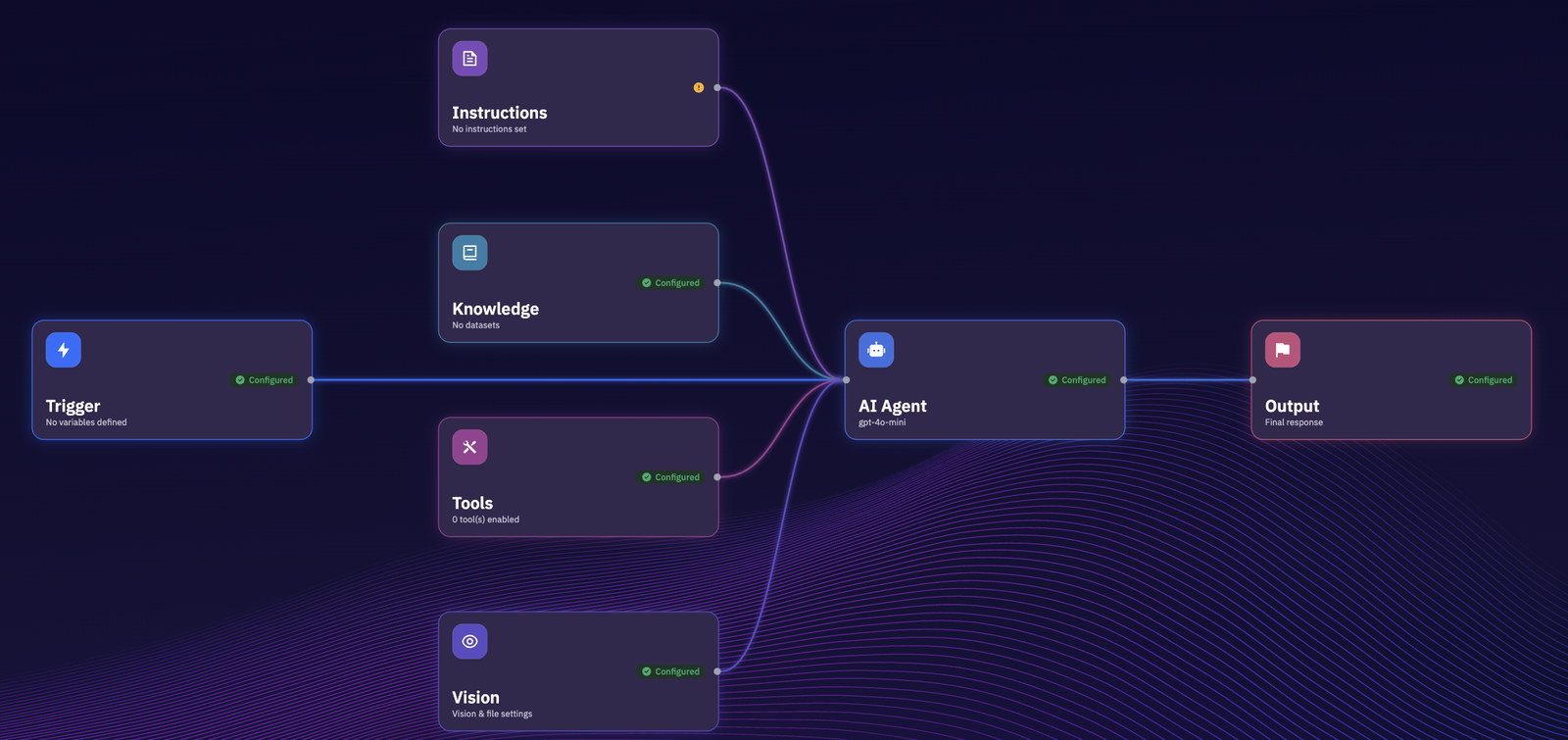
The comparison worth making is not against the twenty lines of each framework’s example. It is against the rest of the system those twenty lines imply.
- Knowledge
- Memory
- Tools
- MCP servers
- Order API
- API
- Chat
- Voice
The part that is hard to show in a code block is what you get afterwards. Every run is kept, step by step, with its inputs, outputs, timings and token counts.
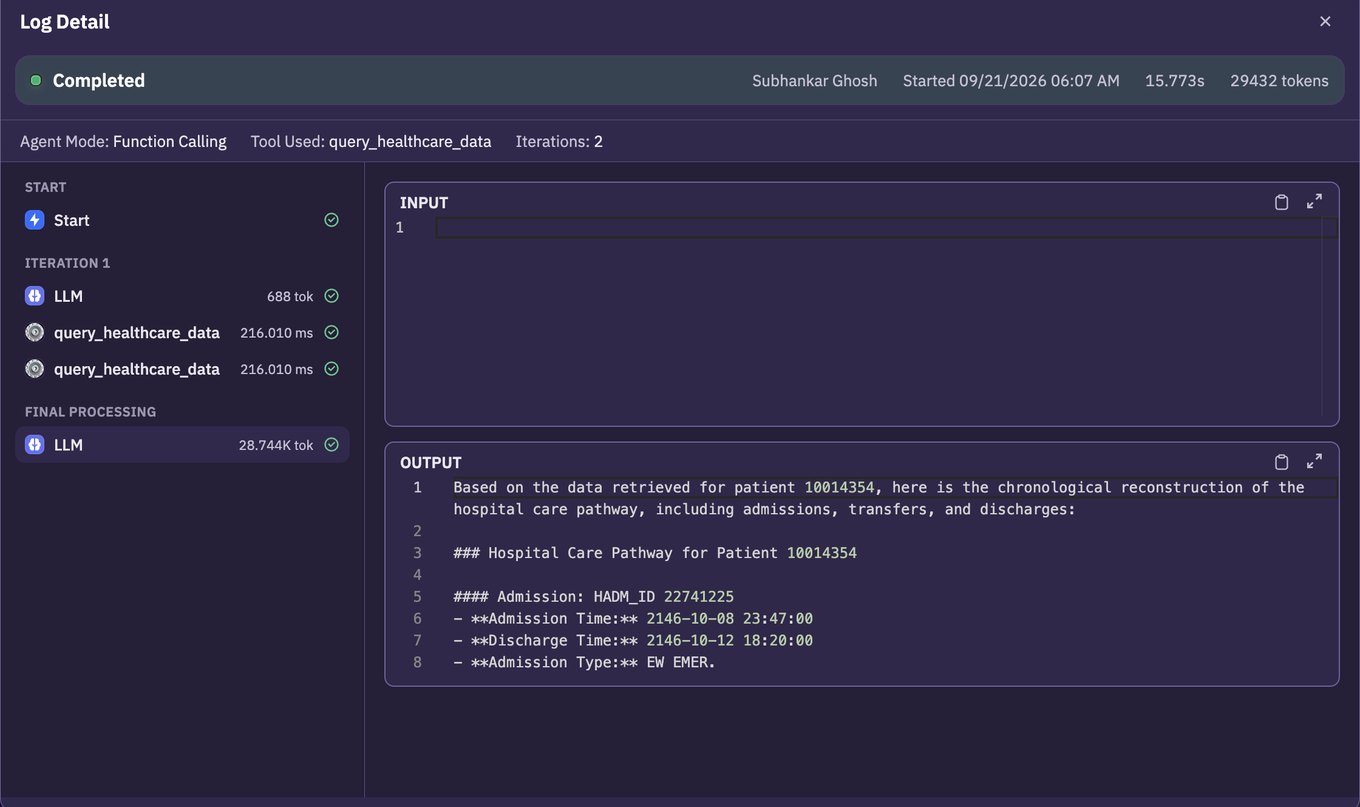
That is the trade. You give up expressing the architecture in your own code, and you stop maintaining the scaffolding around it.
When a framework is the right answer
It would be convenient to argue that nobody should write this in code. That is not true, and anyone who has built with these tools will know it immediately.
Reach for a framework when:
- The agent loop is your product. If the orchestration is the thing customers pay for, own it. A platform will always be a layer you do not control.
- The control flow is genuinely unusual. LangGraph exists because some problems need a specific graph, with state transitions you can prove. Configuration is the wrong shape for that.
- It has to live inside an existing system. If the agent is one function in a large Python service, importing a library beats calling out to a platform.
- You have the team. Someone has to carry the retries, the memory, the approvals, the tracing and the upgrades. That is a real and ongoing cost, and some teams would rather pay it than depend on anyone.
How to choose
Feature tables are a bad way to pick between these, because all five can build the support agent above. What separates them is the shape of the problem you are bringing. So here they are as questions about your problem rather than claims about theirs.
- OpenAI Agents SDK: can the whole job be stated as one set of instructions and a handful of tools? Then one agent is enough, and this is the shortest route to it. You are trading model portability for that speed.
- CrewAI: would you staff this with more than one person? If the work genuinely splits into a researcher and a writer, roles make the design readable at a glance. If it does not, roles are ceremony wrapped around a single agent.
- LangGraph: do you need to promise what happens, rather than ask for it? A graph lets you state the path, checkpoint it, and resume it after a failure. That is worth the extra concepts when a wrong turn is expensive, and overhead when it is not.
- Claude Agent SDK: is the environment the point? When the agent reads files, writes them and runs commands, the question stops being which tools it has and becomes which ones it may use unattended. That belongs in the design, not in a wrapper around it.
- Xpectrum: is the agent the small part? If the loop is a week and the knowledge, channels, approvals and run history are the quarter, you are mostly buying back the second number.
That last one has an honest test, and it is not a feature comparison. Take the agent you were going to build this quarter and split the estimate in two: the agent itself, and everything that has to exist before a real customer can reach it. If the first number dominates, write the code. If the second does, you are choosing what to maintain, not what to build.
Start free with $10 in credit, or see the full comparison across every platform.