
From Any Database or API to an MCP Server in Minutes
Connect PostgreSQL, Supabase, MongoDB, external APIs, or your own business logic in Xpectrum. Build the workflow and expose it through MCP, without building a separate MCP server.

MCP gives agents a common interface to external systems. But connecting your actual systems to MCP still requires a runtime behind that interface.
Your data might live in PostgreSQL, Supabase, or MongoDB. The capability might depend on an external API, custom code, or business logic spanning several systems.
In Xpectrum, you can connect those systems visually, build the workflow, and expose the published workflow through an MCP Server URL.
No separate MCP server implementation for the same workflow.
Build the workflow
Consider get_customer_context.
A support agent needs customer information before answering an account question. That information may not live in one place.
In Xpectrum, you can create a workflow that gets the customer record from Supabase, retrieves recent activity from MongoDB, calls a billing API, and combines everything using your business logic.
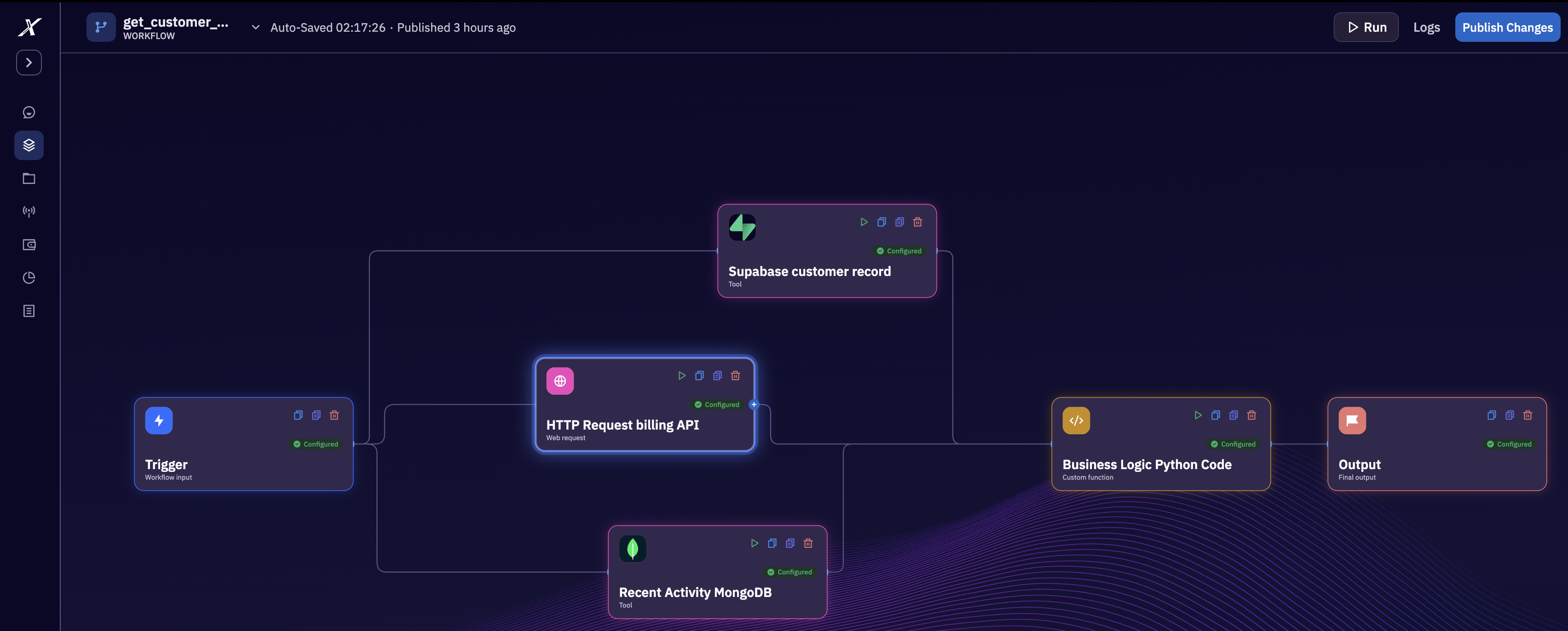
To the agent, this is one capability. Behind it, Xpectrum handles the workflow across all of the connected systems.
The agent doesn't need to know where each piece of data lives or how the systems are connected.
The input can be as small as one identifier:
{
  "customer_id": "cust_1042"
}
From workflow to MCP
Once the workflow is ready, you shouldn't have to rebuild that workflow inside a separate MCP server. Xpectrum exposes the published workflow through an MCP Server URL.
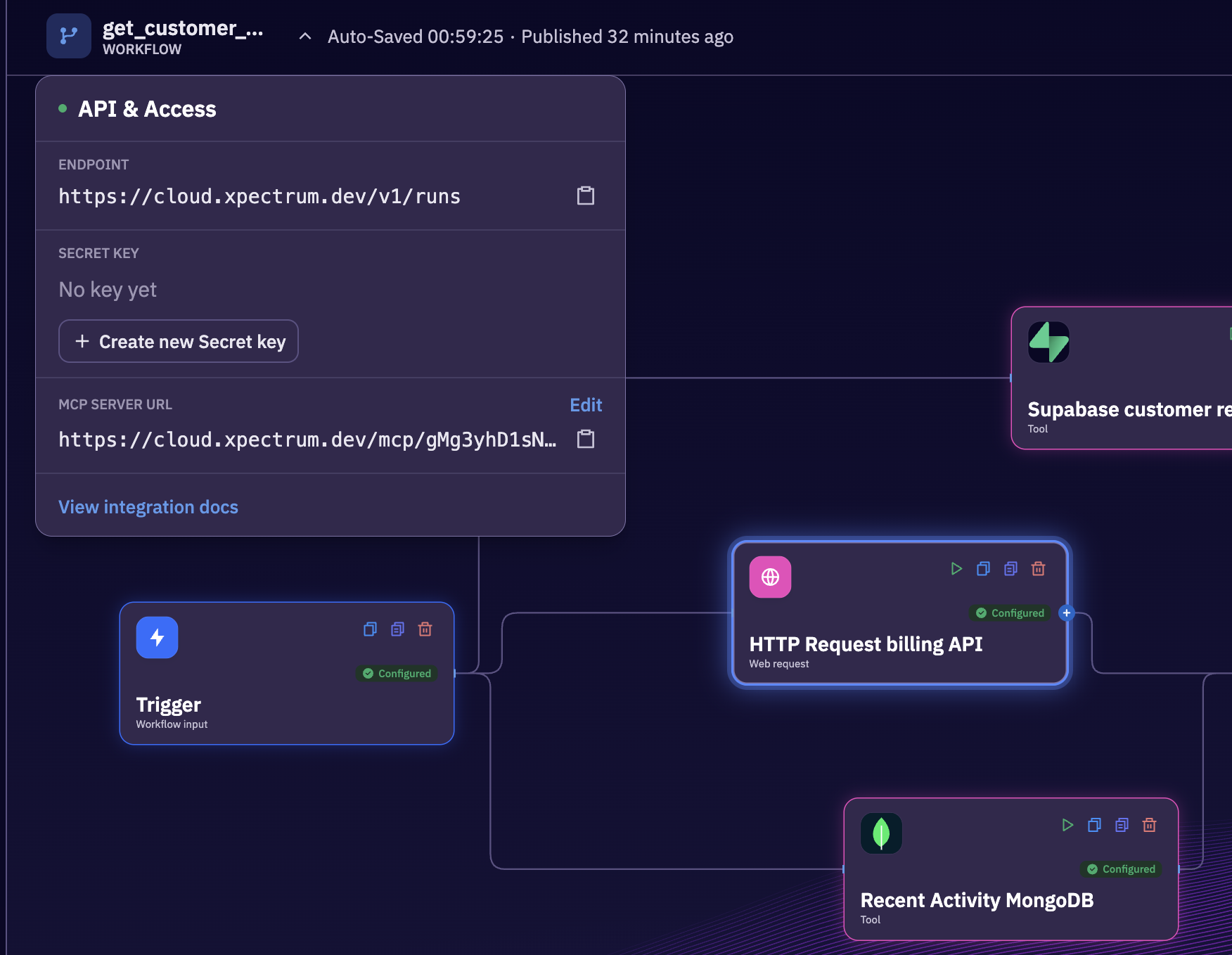
The workflow is the runtime for that capability. MCP becomes the interface through which an agent can invoke it. If you change the billing provider, add another database query, or modify the business logic, update the workflow. You don't need to recreate the capability for every agent that uses it.
MCP is the interface. Your workflow is the runtime.
Connect APIs & Databases
The customer-context workflow crosses three systems, but each step has a specific job. Supabase supplies account details. MongoDB supplies recent activity. The billing API supplies subscription information. Business logic then normalizes those results into the shape the caller needs.
That same pattern can connect PostgreSQL, internal services, or other tools. Choose connections based on where the data lives. Keep joins, transformations, and business rules inside the workflow so the agent does not have to infer them from a collection of unrelated responses.
For our example, the output could look like this:
{
  "customer_id": "cust_1042",
  "account": { "plan": "team", "status": "active" },
  "recent_activity": { "open_tickets": 2 },
  "billing": { "status": "current", "currency": "USD" }
}
Use the customer ID consistently across the steps. If the billing provider uses a different account identifier, resolve that mapping before making the billing request. The workflow should return the same customer in every part of the response. A syntactically valid result is not enough if it combines the profile of one account with the subscription of another. That is exactly the kind of integration rule that belongs behind the workflow.
Define what happens when a dependency cannot answer. If the billing service times out, an empty billing field should not quietly mean “no outstanding balance.” Decide whether the workflow should return a clearly marked partial result or fail the request. Test that behavior alongside the successful path.
Return only the information needed for the task. The support agent needs a useful account summary, not a full database row containing unrelated internal fields. A small, explicit response makes downstream reasoning easier and keeps the workflow’s responsibility clear.
One workflow, two interfaces
Workflow-backed tools also give you a practical unit of composition. A larger workflow can use existing tools for well-defined tasks instead of repeating the same integration logic at every step.
Our customer-context workflow could serve both a conversational support agent and a scheduled account review. The first caller uses the result to answer a question. The second checks the same context as part of a larger process. Both depend on the same meaning of “customer context.”
Keep composition intentional. A workflow that gathers context should stay separate from one that changes billing. A workflow can coordinate the two when needed, with the appropriate decision or approval between them. The boundaries should follow the operations your team wants to own.
This also gives you a focused place to test a change. When the customer-context output evolves, check the callers that depend on it. Adding a field is different from changing the meaning of an existing one; treat the workflow contract as an interface other work relies on.
Use it from MCP clients
An MCP-exposed capability is not limited to an agent running inside Xpectrum. A compatible MCP client can discover the capability and invoke it through the interface you expose. The client sees a callable capability; Xpectrum handles the workflow behind it.
Configure the MCP connection in your chosen client using the endpoint and connection details from Xpectrum. Then check that get_customer_context is available before trying a request. Use the client’s MCP setup instructions rather than assuming every client accepts the same configuration format.
For the first call, use a known test customer and inspect the returned fields. Confirm that the account, activity, and billing data match the underlying systems. Follow with an unknown customer and an unavailable dependency so you know how the agent sees incomplete or failed results.
The integration changes where the request comes from. It does not replace the business rules in the workflow. Keep authorization and the permitted scope of the operation explicit when making the capability available to another caller.
More than database access
The same pattern applies beyond retrieval. A workflow could check inventory, validate a customer, create an order, process payment, update CRM, and send a confirmation. Once that workflow exists, MCP can provide an interface for agents to invoke it.
Once published, the workflow can represent complete business operations rather than thin API wrappers.
Build once. Expose where you need it.
Start with one operation that already spans multiple systems. Give it a narrow purpose, stable inputs, and a response that makes sense to an agent.
- Build the workflow. Connect your systems and define the workflow.
- Test the workflow. Check success, missing data, and failed dependencies.
- Publish the workflow. Xpectrum provides an API endpoint and an MCP Server URL.
- Use the interface. Invoke the workflow through API for apps and MCP for agents.
Your databases, APIs, code, and business rules stay in the workflow. Your existing applications can access that workflow through an API. AI agents can access it through MCP.