
AI Chatbot vs Autonomous Agent vs Agent Flow vs Multi-State Agent: Which Should You Build?
Not every AI application needs an autonomous agent. Sometimes you need a chatbot, sometimes an agent that plans and acts on its own, and sometimes AI inside a workflow where you, not the model, control what happens next.

The word agent has become an umbrella term for almost anything built around an LLM.
A customer support bot is called an agent. A workflow that calls three APIs is called an agent. A system that independently plans, selects tools, and completes a task is also called an agent. But these systems have very different architectures, and that distinction matters.
The more autonomy you give an AI system, the more flexibility you gain, but you also introduce more variability. Making every decision deterministic gives you control while limiting the system’s ability to handle situations you did not explicitly design for.
So before asking which model should I use? there is a more fundamental question:
At Xpectrum we think about this through four common architectures: AI Chatbot, Autonomous Agent, Agent Flow, and Multi-State Agent. Here is what each one does, when to use it, and how to choose between them.
AI Chatbot: when the job is to answer
The simplest architecture is often the right one.
An AI chatbot receives a message, combines it with instructions and relevant context, and generates a response.
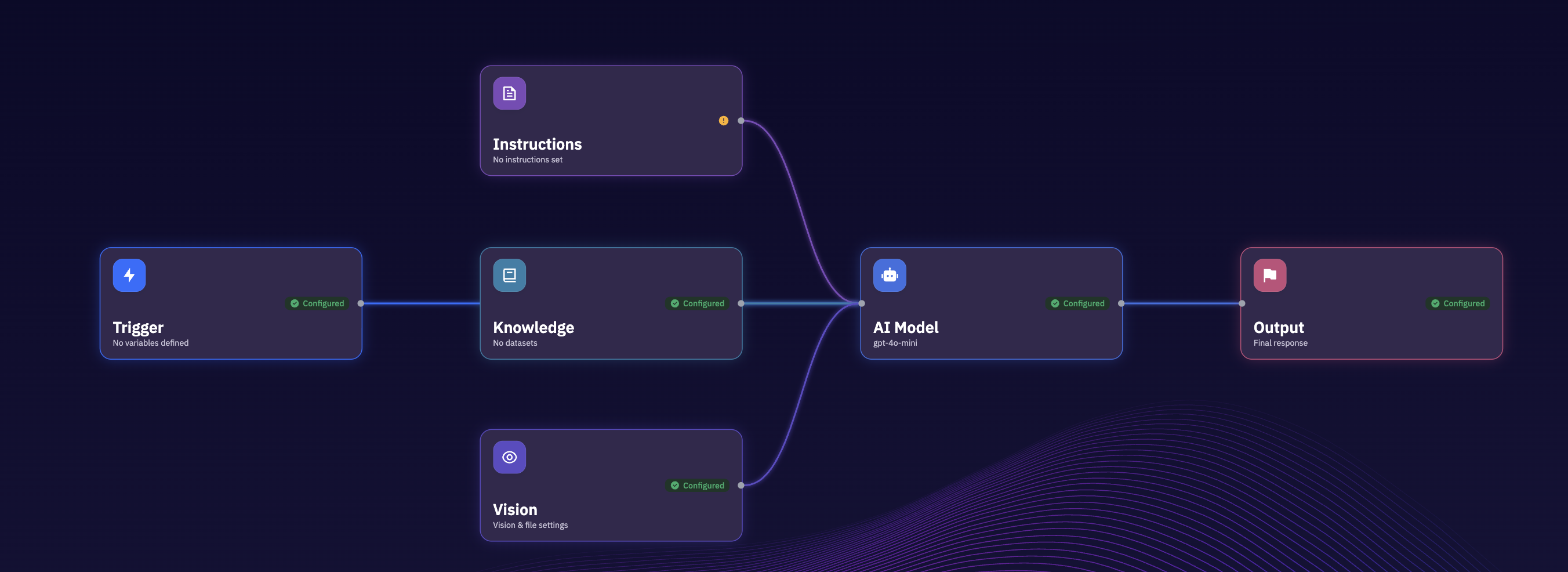
Suppose you are building a support assistant for a SaaS product. A user asks: “How do I connect my Google Calendar?”
The chatbot searches the relevant documentation, retrieves the right information, and explains the steps.
The AI does not need to decide what business process to execute. It does not need to plan five steps ahead. And it does not necessarily need permission to modify anything. Its primary job is to understand and answer.
When should you use it?
A chatbot is a good fit for:
- Documentation assistants
- Knowledge-base search
- FAQ automation
- Internal knowledge assistants
- Product Q&A
- Customer support where answers do not require actions
Adding autonomous behaviour to these applications can create complexity without creating much additional value. If the task is fundamentally question → find context → answer, a chatbot may be all you need.
Autonomous Agent: when the AI needs to figure out the path
Now imagine the user says: “Find three qualified leads in Seattle, research their companies, add them to my CRM, and draft personalised outreach.”
This is no longer a single question. The system has been given a goal. It may need to determine how to find potential companies, search for candidates, evaluate whether they match the criteria, research each company, find relevant contacts, check for duplicates in the CRM, create records, and draft personalised messages.
The important difference is that the developer has not necessarily hard-coded every step. The agent determines what it needs to do.
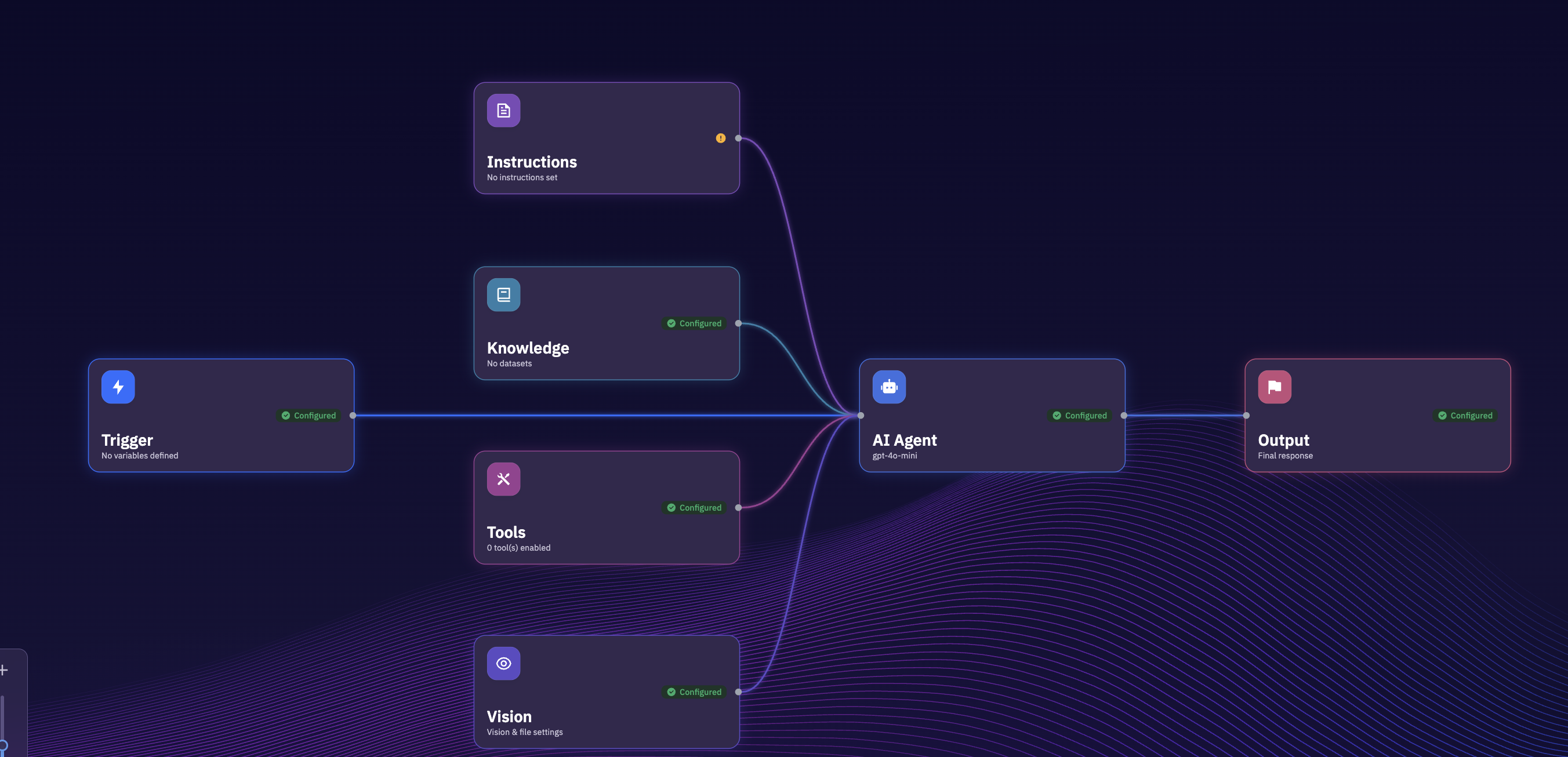
You provide the agent with instructions, models, tools, APIs, knowledge, memory, and guardrails. The agent determines how to use them to accomplish the goal.
Why autonomy is powerful
Real-world tasks do not always follow the same path. One lead may already exist in your CRM. Another may have incomplete information. A search API may return nothing useful. A tool call may fail.
An autonomous agent can reason about these situations instead of requiring you to explicitly design every possible branch.
But autonomy has a cost
More autonomy also means more possible execution paths. That can make systems harder to predict, debug, evaluate, control, and audit.
For open-ended tasks, that trade-off can be worthwhile. For tightly controlled business processes, it may not be. That is where Agent Flow comes in.
Agent Flow: when AI should reason, but you control the process
Consider a customer refund workflow. You probably do not want to tell an autonomous agent: “Handle this refund however you think is appropriate.” The company may have explicit policies.
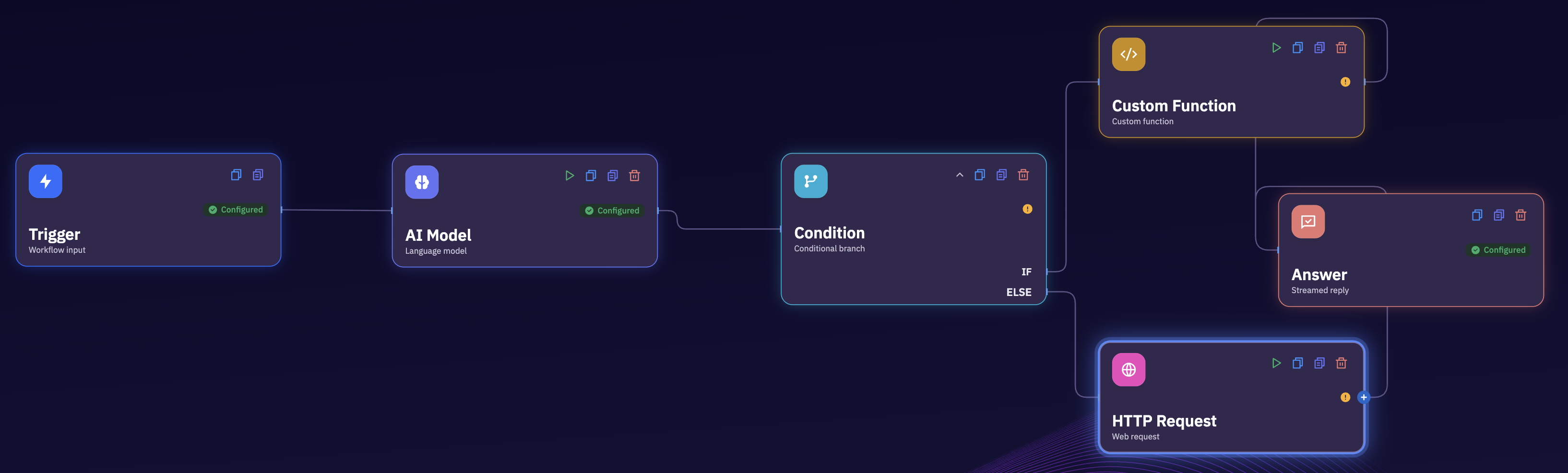
AI can still play an important role. It might classify the customer’s reason, summarise their history, detect unusual circumstances, or generate the response. But the workflow determines what happens next. That is an Agent Flow.
Deterministic orchestration with AI reasoning
This architecture combines two useful properties. You decide which steps exist, which tools are available, when a branch can happen, where approvals are required, and what happens when something fails. AI handles the parts requiring reasoning.
Instead of asking the model to control the entire process, you insert intelligence exactly where it is useful.
Why this matters in production
A demo can tolerate unpredictability. A production workflow touching payments, customer records, healthcare systems, infrastructure, or enterprise data often cannot. You may need to know what happened, why it happened, which model made the decision, which API was called, what data was changed, and where human approval was required.
Agent Flow gives developers tighter control over those boundaries.
When should you use it?
- Customer support operations
- CRM automation
- Order processing
- Incident triage
- Document processing
- Approval workflows
- Finance operations
- Internal enterprise processes
A useful rule is: let AI reason inside the process without necessarily letting AI own the process.
Multi-State Agent: when the conversation is the workflow
Some applications do not look like traditional workflows at all. They happen through conversation.
Imagine an AI receptionist for a clinic. The conversation may move through greeting, understanding the patient need, collecting patient information, determining the appointment type, finding availability, confirming, and sending a confirmation.
The user may interrupt at any point. They might say: “Actually, Friday doesn’t work. What about Monday?”
The system needs to understand both the message and where the user currently is in the process. That is where a Multi-State Agent becomes useful. Instead of treating every message independently, the agent maintains a defined conversational state.
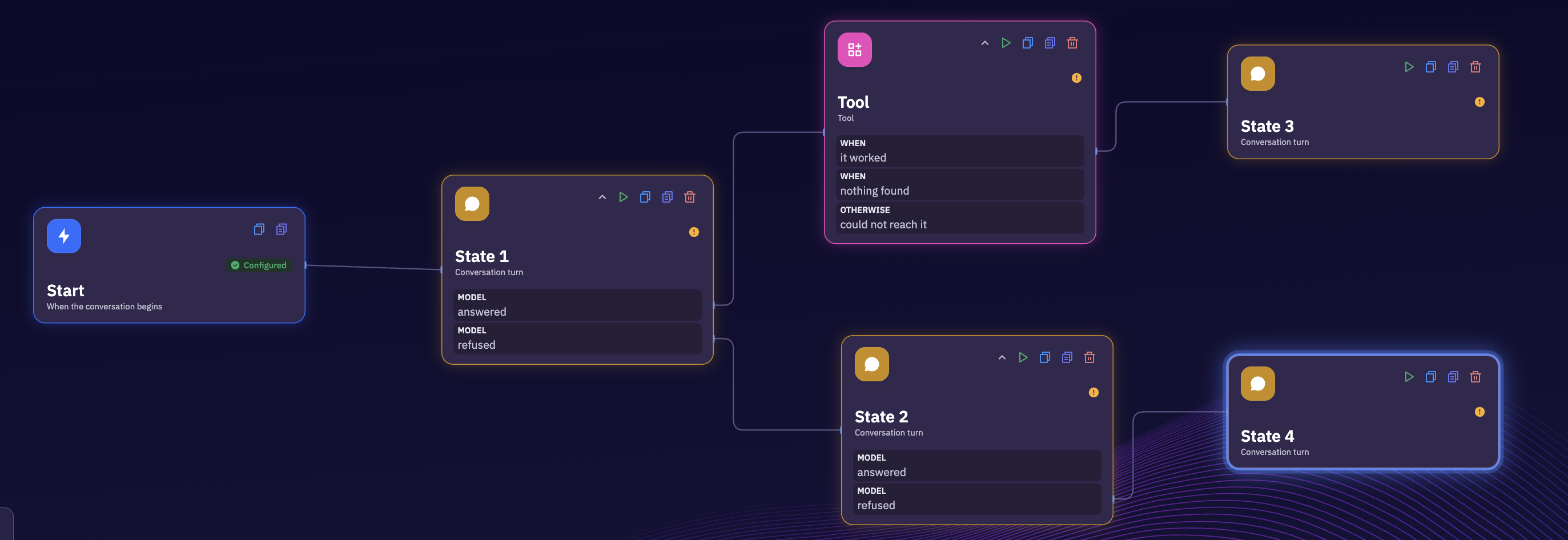
Each state can have its own instructions, tools, knowledge, validation rules, and transition conditions. The AI handles natural conversation inside the state, while the application controls how users progress between states.
Why not use one giant prompt?
You could put the entire process into one enormous system prompt. But as the application grows, that becomes increasingly difficult to manage.
Different stages may have different responsibilities. The qualification stage should not necessarily have access to the same tools as the payment stage. The scheduling stage should not accidentally restart onboarding. Explicit states make those boundaries clearer.
When should you use it?
- Lead qualification
- Appointment booking
- Patient intake
- Customer onboarding
- Sales conversations
- Insurance intake
- Recruiting screens
- Guided support
- Voice agents
If your application feels like a conversation moving through a process, think in states.
So which architecture should you choose?
Start with the behaviour you need, not with the word agent.
- Does the system primarily need to answer questions? Use an AI Chatbot. User → knowledge → AI → answer.
- Does the system receive a goal and need to determine how to accomplish it? Use an Autonomous Agent. Goal → reason → tool → observe → reason → tool → result.
- Do you already know the business process and want AI inside specific steps? Use an Agent Flow. Trigger → step → AI → condition → tool → approval → action.
- Does the user need to move through stages of a conversation? Use a Multi-State Agent. State 1 ↔ state 2 ↔ state 3 ↔ state 4.
The distinction is not about which architecture is more advanced. It is about where you want control to live.
Autonomy is a spectrum
These architectures do not need to exist in isolation. A production application might combine all four.
Imagine an AI customer-support system. A customer starts with an AI Chatbot, which answers product questions from the knowledge base.
Then the customer says: “Cancel my subscription and refund my last payment.” That can trigger an Agent Flow. The system verifies the account, checks the refund policy, requests approval if necessary, processes the refund, and records the action.
Suppose the customer instead says: “Help me migrate everything from my current provider.” That could trigger an Autonomous Agent, which determines the migration steps, gathers information, calls tools, and adapts when problems occur.
And if the company needs to collect structured information from the customer first, the interaction could move through a Multi-State Agent.
This is often closer to how production AI applications actually work. You do not need to choose one architecture for your entire product. You choose the right amount of autonomy for each part of the system.
The architecture matters more than the prompt
A lot of AI development still starts with “let’s improve the prompt.” But many reliability problems are not prompt problems. They are architecture problems.
If a process needs deterministic routing, adding another paragraph to the system prompt will not make an autonomous agent deterministic. If an application needs to maintain clear conversational stages, asking one large agent to remember where it is may become fragile as complexity increases. If the task only requires answering questions, building an elaborate planning loop may be unnecessary.
The architecture defines what the model can decide, what the developer controls, which tools can be called, how state is maintained, where failures can occur, where humans intervene, and how the system can be observed and debugged.
The LLM is one component inside that architecture.
Building these architectures in Xpectrum
Instead of forcing every AI application into one abstraction, Xpectrum lets you build different types of agents depending on the problem.
- AI Chatbots for knowledge-driven conversations.
- Autonomous Agents for open-ended goals and tool use.
- Agent Flows for controlled, production workflows with AI reasoning.
- Multi-State Agents for structured conversational processes.
These agents can connect to APIs, databases, knowledge bases, models, and external tools, while maintaining the controls needed for production applications.
And the same application does not have to live in only one interface. An agent can interact through chat, voice, phone, SMS, WhatsApp, or email. The interface can change; the underlying application logic does not have to.
Start with one question
Before building your next AI application, ask:
If the answer is that no decision is necessary and you just need to answer the user, start with a chatbot. If the model should decide, build an autonomous agent. If you should decide, build an Agent Flow. If the current stage of the conversation should decide, build a Multi-State Agent.
Choosing that boundary early can make the difference between an impressive AI demo and an AI application you can actually run in production.